Important for new users:On demand measurements with the cuff will only be displayed after 4 successful calibrations have been completed (one calibration per day during the first 4 days).
Even if you already know your average blood pressure from your Hilo Band measurements, you may sometimes want to check your blood pressure at a specific moment (for example, if you are not feeling well or want immediate reassurance). In this case, you can take a manual measurement using the Hilo Cuff.
Follow these steps to make an on-demand measurement:
Charge the cuff fully (switch ON while charging)
Disconnect the power cable
Switch the cuff ON; it will start blinking blue
Open your Hilo App and go to the "Measure" tab
Pair the cuff (if not already paired) and select 'Take Hilo Cuff measurement'

The app will guide you through performing an accurate cuff measurement.
>> Please remain still and refrain from speaking during the process.<<
The cuff will inflate automatically to take your blood pressure measurement.
 |  |  |
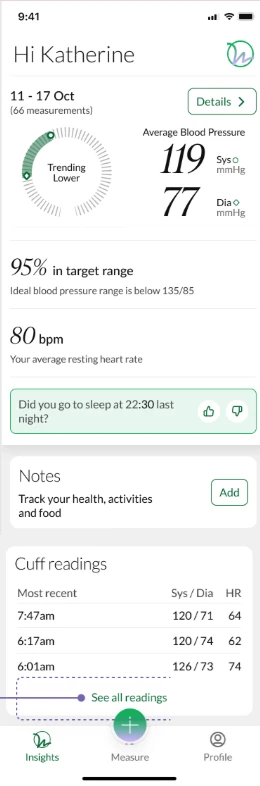
Once the measurement is complete, you will be shown the result and view your spot measurements by navigating to the 'Insights' tab and scrolling down to 'Cuff readings.'
To access all cuff measurements, click on 'See all readings'
Additionally, you can generate a report to review the cuff measurements, which are marked with a cuff icon next to the HR value. This feature helps differentiate cuff measurements from those taken with the bracelet or camera.
 |  |
Was this article helpful?
That’s Great!
Thank you for your feedback
Sorry! We couldn't be helpful
Thank you for your feedback
Feedback sent
We appreciate your effort and will try to fix the article