When you open your Hilo app, the first screen you land on is the Insights screen and the first thing you will see here, is your average systolic (Sys) and diastolic (Dia) blood pressure readings over the past 7 days.
For example: 109 Sys and 67 Dia
The label above the numbers (e.g. "OPTIMAL") indicates your ‘average blood pressure readings during the last 7 days based on 2023 European Society of Hypertension (ESH) guidelines.
Category | SYS (Systolic mmHg) | DIA (Diastolic mmHg) |
|---|---|---|
Optimal | <120 | <80 |
Normal | 120–129 | 80–84 |
Elevated | 130–139 | 85–89 |
High Blood Pressure Stage 1 | 140–159 | 90–99 |
High Blood Pressure Stage 2 | 160–179 | 100–109 |
High Blood Pressure Stage 3 | ≥180 | ≥110 |
Just below the average, it compares the average of the last 7 days with that of the previous week (here, last week was 133/89). This helps you track improvements or changes over time
Important for new users:
Blood pressure measurements will only be displayed after 4 successful calibrations have been completed (one calibration per day during the first 4 days). Until then, no measurements or averages will be shown.
The Time in target range section shows the percentage of time your blood pressure readings stayed below the target value of 130/85 mmHg.
For example, 75% of your readings this week were within target.
It also breaks down the percentage of readings that were Optimal, Normal, Elevated, or High.
For a more detailed explanation of this section and what each range means, please refer to: https://aktiia.freshdesk.com/en/support/solutions/articles/80001142327-what-is-time-in-target-range-ttr-
The Average HR section shows your heart rate (HR), measured in beats per minute (BPM), averaged over the past 7 days. In the example shown, the average is 65 BPM, which is within the typical resting heart rate range for adults (60–100 BPM).Next to the main number, a small line chart displays how your heart rate varied over the last 7 days, helping you identify trends or fluctuations throughout the week.
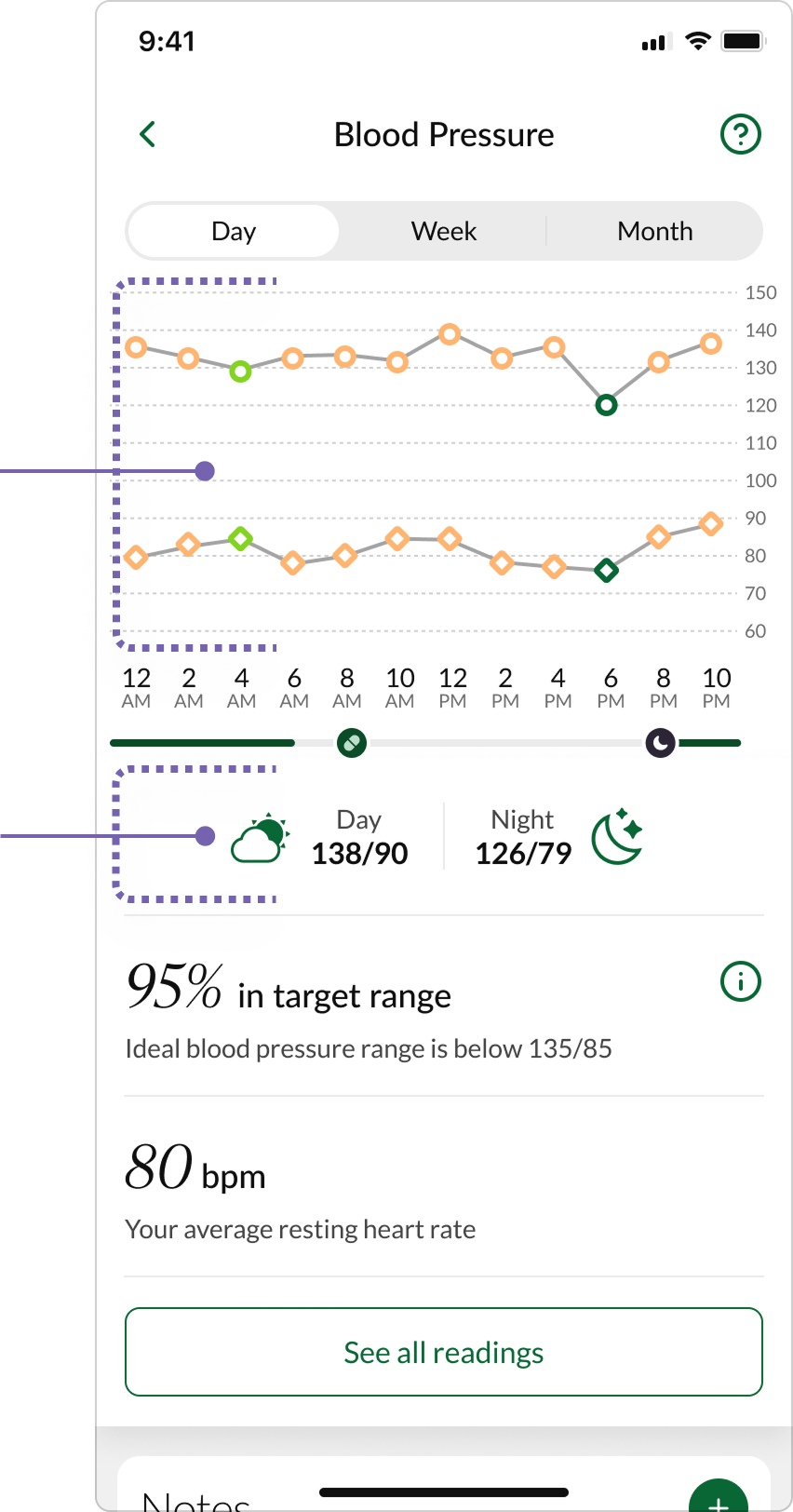
Clicking anywhere on the top of the Average Blood Pressure card opens a new page displaying a more detailed Blood Pressure screen with 2-hour averages, allowing you to choose a daily, weekly, or monthly time range.
Below the graph, you will see your averages for the day and night. Additionally, you can click on "See all readings" to view all individual readings, not just the averages.
Was this article helpful?
That’s Great!
Thank you for your feedback
Sorry! We couldn't be helpful
Thank you for your feedback
Feedback sent
We appreciate your effort and will try to fix the article